

The best commercial electronic door lock blends Grade 2 strength, simple code control, and nonstop reliability.
You handle keys all day, chase missing spares, and worry about after-hours access. A solid electronic lever fixes that. Staff punch a code and walk in. Tenants use fobs. Vendors get timed access. You cut the keys, the lock keeps the schedule, and the door tracks who gets in. The right pick saves time and headaches. It also looks clean on the door. In this guide, I’ll help you choose the best commercial electronic door lock for your building, office, or storefront—without tech confusion or wasted spend.

SCHLAGE Brushed Chrome FE595CS V…
This product adds a great value Product is highly durable and very easy to use This product is manufactured in China Projection:4.5 inches

Schlage Plymouth Keypad Lock with…
Keyless entry for enhanced security, no keys to lose or forget Auto-Lock feature automatically re-locks after 5 seconds, Inside lever always unlocked Keypad illuminates so you can see it at…

Hicarer Stand-Alone Commercial Door Lock…
Long-lasting and Anti-corrosion Build: our electronic digital lock set with lever is crafted with stainless steel lock body and zinc alloy panel, treated with anti-corrosion and anti-scratch coating to protect…
Schlage FE595 Plymouth Keypad Lever (Satin Chrome)

The Schlage FE595 Plymouth with Elan lever is a light commercial keypad lock that nails the basics. It looks clean, installs fast, and takes daily use well. You set user codes in minutes and skip keys for routine access. The satin chrome finish blends into offices, clinics, and backroom doors.
The FE595 uses Flex‑Lock. That means you can switch between auto‑locking or unlocked passage, without reprogramming. It is BHMA/ANSI Grade 2, which suits busy interiors and side doors. Battery changes are quick, and the keypad is easy to see. If you want a simple, strong pick, this one hits the mark.
Pros:
- Flex‑Lock lets you toggle auto‑lock or passage on the fly
- Grade 2 rating for dependable light commercial use
- Fast install on most standard doors with common tools
- Clean, professional look in satin chrome
- Simple programming with clear steps and no app needed
Cons:
- No audit trail or advanced scheduling
- Keypad codes only (no card or fob support)
- Not suited for exterior gates exposed to harsh weather
My Recommendation
This is a great pick for offices, clinics, and classrooms that want simple code access. You get the best commercial electronic door lock feel without the complex software. It is ideal if you need quick code changes, light duty security, and a pro look. I like it for interior doors and staff entrances that see steady use.
| Best for | Why |
| Offices and clinics | Simple code changes and Grade 2 durability |
| Classrooms or storerooms | Flex‑Lock for fast switch to passage mode |
| Side doors with steady traffic | Reliable hardware from a trusted brand |
Schlage FE575 Plymouth Keypad Lever (Auto-Lock)
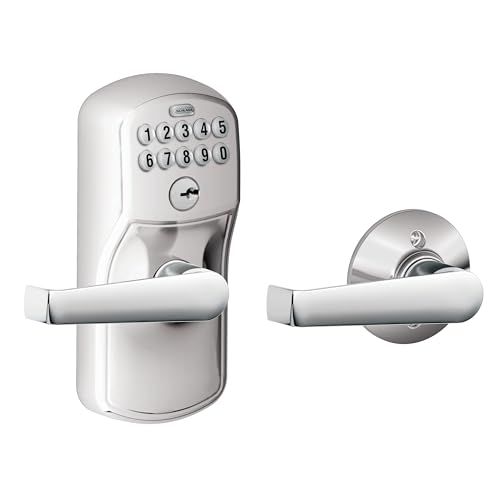
The Schlage FE575 is like the FE595 but with fixed auto‑locking. It relocks every time the door closes. That stops the classic “someone forgot to lock up” moment. The keypad is easy to read, and the lever feels sturdy in the hand.
This model suits doors that must always lock, like supply rooms or front office entries. Programming is simple and quick. As a light commercial option, it gives you user code control without any network setup. If your priority is automatic security, this model is a safe bet.
Pros:
- Auto‑locking by default for fewer lockup mistakes
- Solid Schlage build and smooth lever action
- Good for shared spaces with frequent traffic
- DIY-friendly install on standard door preps
- Clear keypad layout and tactile buttons
Cons:
- No passage mode for propped or open access times
- Codes only; no card or fob option
- Not designed for heavy exterior abuse
My Recommendation
Pick the FE575 if you want a set‑it‑and‑forget‑it auto‑locking setup. I suggest it for supply rooms and front desks that must relock every close. It feels like the best commercial electronic door lock for teams prone to leaving doors unlocked. You gain peace of mind with very little training needed.
| Best for | Why |
| Supply and file rooms | Auto‑lock reduces human error |
| Reception entries | Always secure between uses |
| Shared offices | Quick code setup for rotating users |
Hicarer Stand-Alone Keypad Lock with Card and Key

This Hicarer lock is a flexible, stand‑alone unit that takes PIN codes, RFID cards, and a physical key. That mix makes it great for warehouses, apartments, and small offices. Staff can tap a card while managers use a master PIN. The stainless steel look holds up in busy areas.
It does not need Wi‑Fi or a hub. Setup is done at the door, so you control it locally. This helps when you want easy deployment across several doors. For the price, it packs good utility for small businesses.
Pros:
- Three entry modes: PIN, RFID card, and key
- Stand‑alone design with no network needed
- Good fit for mixed‑use spaces and rentals
- Metal build and simple keypad layout
- Budget‑friendly for multi‑door rollouts
Cons:
- No cloud or app features for remote management
- Programming at the door can take longer for many users
- Limited advanced scheduling options
My Recommendation
If you need codes and cards in one simple package, this is a smart pick. I like it for property managers and small warehouses that want to avoid rekeying. It feels close to the best commercial electronic door lock for mixed access needs on a budget. Use it where you want physical cards for fast entry.
| Best for | Why |
| Warehouses | Card tap speeds up entries with gloves or gear |
| Apartment common areas | Multiple modes for tenants and staff |
| Budget multi‑door installs | Affordable and stand‑alone design |
NDL302 Keyless Lock with Keypad, Fobs, Remote
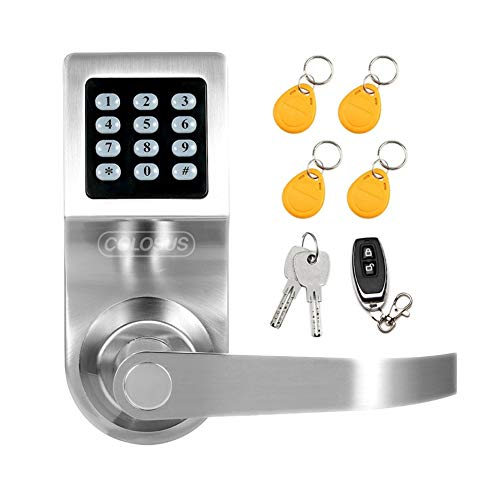
The NDL302 is a feature‑rich lock that supports keypad PINs, key fobs, a remote control, and a physical key. It suits small offices and service doors where quick tap access helps. The silver finish looks modern, and the lever action is smooth. For mixed user groups, it offers fast ways in.
Remote control entry is handy for reception areas or back‑office use. You can buzz someone in without leaving your desk. It is a stand‑alone solution, so setup is at the door. If you want flexibility without a full access system, this is a good call.
Pros:
- Multiple entry modes, including remote control
- Good for front desks and service doors
- Fast fob access reduces wear on the keypad
- Stand‑alone and easy to deploy
- Backup keyway for fail‑safe entry
Cons:
- Remote range and battery life vary by environment
- No audit logs or advanced reporting
- Not a networked, enterprise solution
My Recommendation
Choose the NDL302 if you want speed and comfort. It is great in reception spaces where a remote unlock saves time. I see it as the best commercial electronic door lock for simple, flexible entry with fobs and a remote. It fills the gap between basic keypads and full systems.
| Best for | Why |
| Reception desks | Remote unlock from the counter |
| Service doors | Fobs speed up quick entries |
| Small offices | Easy setup with no network |
Kwikset SmartCode 955 Pembroke Keypad Lever

The Kwikset SmartCode 955 is built for high traffic. It has a Grade 2 commercial rating and a tough metal chassis. The 10‑button keypad is clear and stands up to heavy use. Kwikset rates the battery life for up to three years, which is a nice plus.
It offers passage, auto‑lock, and secure modes with quick toggles. The lever is sturdy, and the satin nickel finish looks sharp on office doors. Programming is simple. If you need a rugged, no‑nonsense keypad lever, this one delivers.
Pros:
- Commercial Grade 2 durability for heavy daily use
- Up to 3‑year battery life claim for less upkeep
- Multiple modes: auto‑lock, passage, secure
- Fast install on standard commercial door preps
- Trusted brand with broad parts support
Cons:
- No card or fob options
- Not networked; door‑side programming only
- Button wear can show with very high traffic over time
My Recommendation
This is my pick for busy suites, corridors, and common rooms. It has the bones you want in the best commercial electronic door lock for steady hands‑on use. If you want long battery life, clear modes, and a firm lever, the 955 is hard to beat. It is a real workhorse.
| Best for | Why |
| High‑traffic interiors | Grade 2 build and strong keypad |
| Office corridors | Passage and auto‑lock modes on tap |
| Property managers | Simple code control and long battery life |
Alarm Lock Trilogy DL2700 T2 Standalone Lock

The Alarm Lock Trilogy DL2700 is a proven, heavy‑duty keypad lock for serious sites. It is a favorite in schools, healthcare, and retail because it lasts. The keypad is sealed and the body is robust. You can store a large set of user codes and manage them at the door.
It is stand‑alone, so there is no server to maintain. Yet it still gives you pro features like timed entry windows and lockout functions. If you need a rock‑solid solution for critical doors, the DL2700 is a benchmark. It feels like the “tank” of keypads.
Pros:
- Industry‑trusted for demanding use cases
- Large user code capacity for bigger teams
- Programmable features like timed access windows
- Rugged metal build resists abuse
- Great track record in schools and healthcare
Cons:
- Higher price than light commercial options
- Programming takes a learning curve
- No native card/fob or network features in this model
My Recommendation
Pick the DL2700 for doors that cannot fail. It is the best commercial electronic door lock when uptime and ruggedness matter most. I recommend it for schools, clinics, and exterior employee doors. It will outlast cheaper picks in heavy use spaces.
| Best for | Why |
| Schools and campuses | Proven durability and big user capacity |
| Healthcare facilities | Rugged keypad resists wear and cleaning |
| Retail back doors | Reliable stand‑alone control without servers |
BRINKS Grade 2 Keypad Lever (Satin Nickel)

This BRINKS keypad lever is ANSI Grade 2 and supports up to 99 user codes. It auto‑relocks and includes a battery with a backup keyway. The satin nickel finish looks great in modern spaces. It is a budget‑savvy choice for offices and rentals.
Setup is straightforward and code changes take seconds. The buttons are well spaced and easy to press. For the price, it balances security and ease of use well. If you want a simple, tough keypad lever, this is worth a look.
Pros:
- Grade 2 rating for reliable light commercial service
- Up to 99 user codes for growing teams
- Auto‑relock reduces lockup mistakes
- Backup keyway for emergencies
- Value price for multi‑door projects
Cons:
- Not networked; changes done at the door
- No RFID card or fob support
- Keypad can show smudges over time
My Recommendation
This lock is a strong fit for budget‑minded managers. It feels like the best commercial electronic door lock when you want Grade 2 security and 99 codes without the high price. I suggest it for small suites, coworking areas, and light commercial entries. It is a clean, practical pick.
| Best for | Why |
| Small businesses | Grade 2 build at a good price |
| Shared workspaces | 99 codes handle rotating users |
| Rental turnovers | Easy add/delete of codes |
Veise Keypad Lever with Auto-Lock (Satin Nickel)

The Veise keypad lever is a budget option with auto‑locking and passage mode. It installs fast and fits most standard doors. The keypad is crisp and the lever looks sleek. For light duty, it is a nice value choice.
Use it for internal office doors, storage closets, or staff‑only rooms. It is simple to program and to update codes. While not a heavy commercial tank, it handles everyday use well. It is a solid starter pick for small teams.
Pros:
- Auto‑lock plus passage mode for flexibility
- Quick and easy DIY installation
- Clear keypad with simple code management
- Great price for light commercial needs
- Attractive satin nickel finish
Cons:
- Not intended for very high traffic or harsh use
- No advanced features like audit or scheduling
- Limited brand support compared to tier‑one brands
My Recommendation
Pick Veise if you want a low‑cost, clean keypad lever for light use. It can be the best commercial electronic door lock for startups and small shops that need code access now. You keep costs down and still get key features like auto‑lock. It is an easy win for interior doors.
| Best for | Why |
| Startups | Low cost with key features |
| Staff rooms | Simple codes and quick install |
| Light traffic doors | Value without overkill |
BRINKS Grade 2 Keypad Lever (99 Codes)

This BRINKS variant also delivers ANSI Grade 2 strength with support for up to 99 codes. It features auto‑relock and a backup keyway. It is aimed at commercial and residential use, so it fits many door types. The keypad layout is familiar and easy to learn.
It is a fine match for property managers who want quick turnover of codes. You do not need any app to make changes. The price is friendly for multi‑door needs. It is a reliable pick for standard offices and shared areas.
Pros:
- Grade 2 durability across many door types
- 99 user code capacity for flexible access
- Auto‑relock with simple programming
- Backup keyway for failsafe access
- Great value for multi‑unit installs
Cons:
- No cloud or app functions
- No fob or card options
- May need periodic keypad cleaning in dusty sites
My Recommendation
Choose this BRINKS if you like a proven, value Grade 2 lock with 99 codes. For many small businesses, it is the best commercial electronic door lock for code‑only control. It is simple, clean, and effective. It shines in standardized rollouts.
| Best for | Why |
| Property managers | Fast code turnover across units |
| Shared offices | Enough codes for rotating teams |
| Budget‑minded installs | Strong value and easy maintenance |
Schlage FE595 Plymouth Flex‑Lock (Satin Chrome)
This FE595 variant includes Schlage’s Flex‑Lock feature with the classic Plymouth trim. It lets you switch between auto‑lock and passage without reprogramming. The result is fast control for classrooms, conference rooms, and day‑to‑day shifts. The satin chrome finish fits most commercial designs.
Setup is simple, and code updates are quick. It is Grade 2, so it suits busy interiors and side entries. The lever is ergonomic and feels solid. If you want flexibility with no fuss, this one works very well.
Pros:
- Flex‑Lock for quick switching between modes
- Reliable Schlage hardware and finish
- Grade 2 for light commercial demands
- Easy code management and install
- Clean design blends into most spaces
Cons:
- No audit features or reporting
- Pin‑pad only; no fobs or cards
- Not for rough exterior exposure
My Recommendation
Pick this FE595 if you need fast mode changes for mixed‑use rooms. In many setups, it is the best commercial electronic door lock for shared spaces that switch from open to secure. You get Schlage quality and an easy workflow. I recommend it for offices and schools.
| Best for | Why |
| Conference rooms | Quick passage to secure mode toggle |
| Classrooms | Simple, reliable keypad entry |
| Side entries | Solid Grade 2 performance |
FAQs Of best commercial electronic door lock
What grade should I choose for a commercial keypad lock?
Look for ANSI/BHMA Grade 2 for most offices and interiors. Choose Grade 1 for heavy duty or exterior abuse.
How many user codes do I really need?
Small offices often need 10–30. Property managers may need 50–100. Plan for growth and vendors.
Do I need Wi‑Fi or an app for my lock?
Not always. Stand‑alone locks work well if you can program codes at the door.
Are keypad locks weatherproof?
Many are weather‑resistant, not weatherproof. For harsh exteriors, pick locks rated for outdoor use.
How often do I change batteries?
Most last 1–3 years. High traffic and cold weather reduce life. Keep spare batteries on site.
Final Verdict: Which Should You Buy?
For most offices, the Kwikset SmartCode 955 and Schlage FE595 are safe, simple choices. They feel like the best commercial electronic door lock options for daily use and quick code updates.
Need a tank? Go for the Alarm Lock Trilogy DL2700. Want budget flexibility? BRINKS and Hicarer deliver strong value. Pick based on traffic, access modes, and how you manage codes.