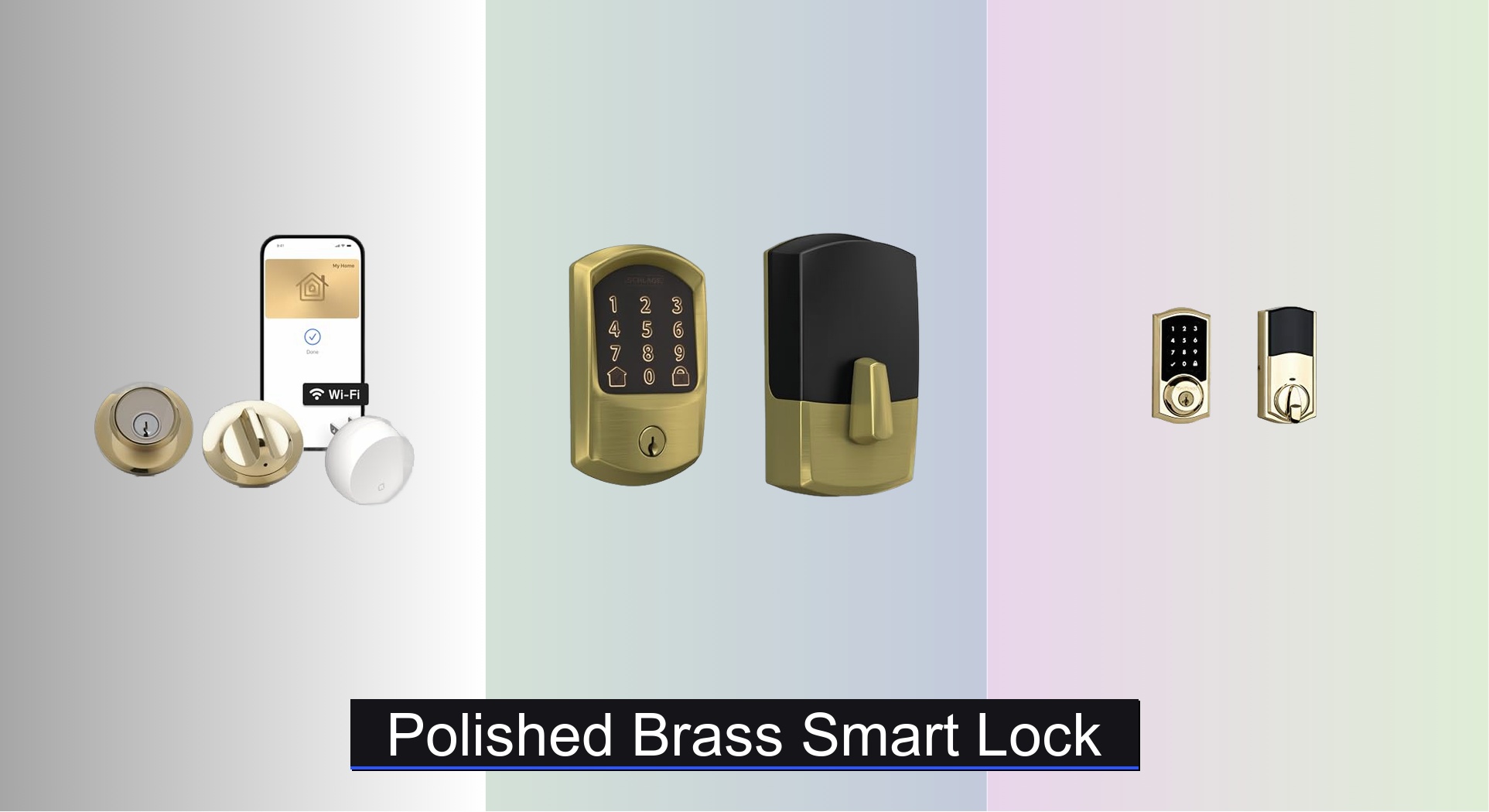
A polished brass smart lock combines a bright, gold-toned finish with electronic access features, such as phone control, keyless entry, or automatic locking. The right choice depends on your door, preferred access methods, smart home system, and desired level of physical security.
In American homes, the front door often sets the tone for the whole house. A polished brass smart lock can complement classic Colonial homes, traditional entryways, craftsman-inspired interiors, and modern homes that use warm metal accents. Its glossy finish adds a familiar touch while smart features can make daily entry easier.
Before buying, check more than the color. Some smart locks replace the full deadbolt, while others fit inside an existing lock and keep the outside hardware. A product listed in polished brass may also use a plated or coated finish rather than solid brass. These details affect fit, appearance, upkeep, and cost.
This guide explains how to choose, install, and care for a polished brass smart lock in the United States. It also covers battery needs, phone compatibility, privacy, and common setup problems. Product specifications can change, so confirm the current manual and compatibility list before ordering.
Source: smartlockadvice.com
What Is a Polished Brass Smart Lock?
A polished brass smart lock is an electronic door lock with a shiny, warm gold-toned finish. Depending on the model, it may use a motorized deadbolt, a phone app, a keypad, a touch sensor, or a compatible smart home system. The brass appearance is a finish choice; it does not by itself describe how the lock works or how resistant it is to forced entry.
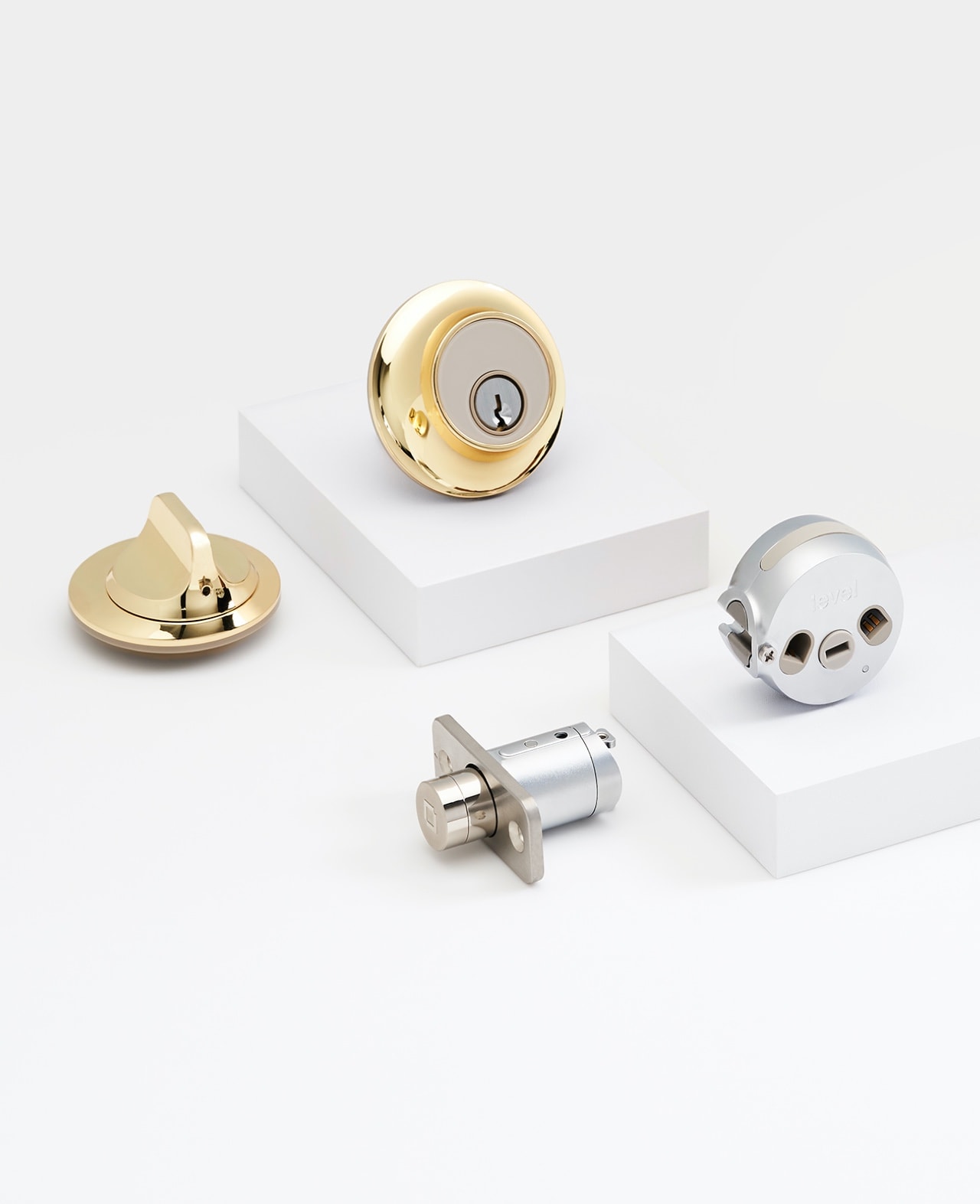
Most residential smart locks are designed for an exterior entry door with a compatible deadbolt. Some replace the indoor and outdoor parts of the lock, while retrofit models replace only the interior mechanism. The second type can be useful when you want to preserve a traditional exterior keyway and matching brass hardware.
The phrase polished brass can describe different materials and finishes. A lock may use brass-colored plating over another metal, a protective coating, or brass components with a polished surface. Check the manufacturer’s material and finish description instead of assuming that the entire lock is made from solid brass.
Source: smartlockadvice.com
Traditional appearance
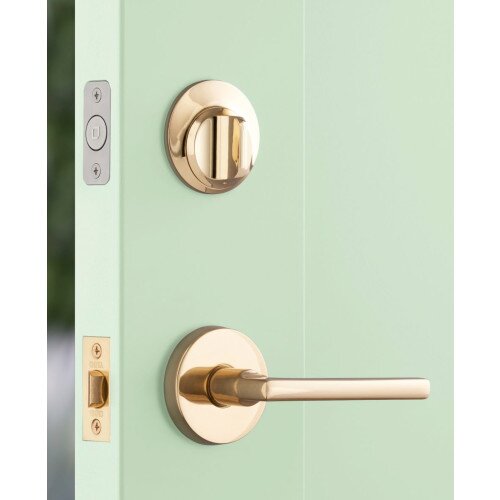
The reflective gold tone pairs well with classic door handles, brass hinges, warm wood, and traditional entry hardware.
Electronic access
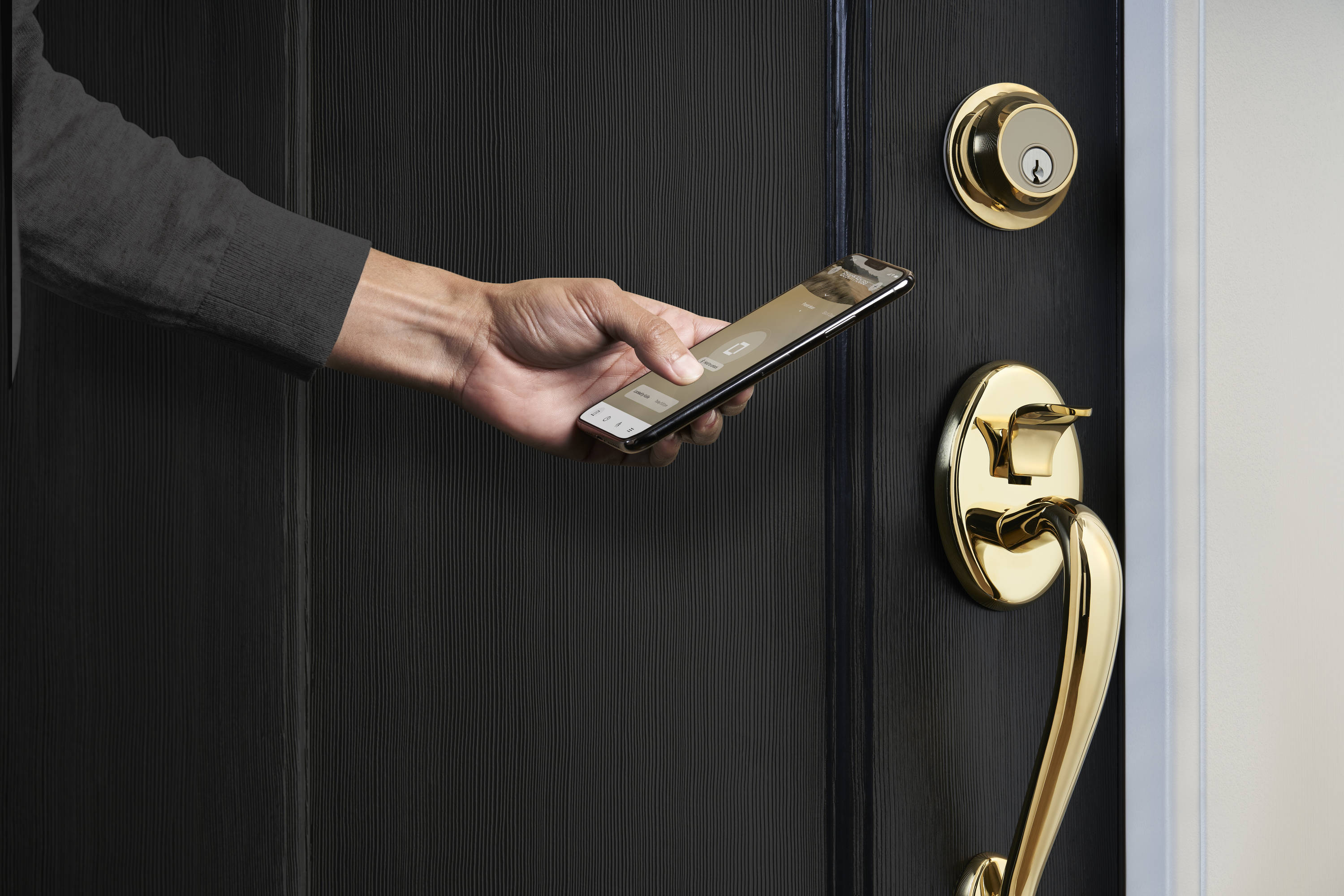
Depending on the model, you may unlock the door with an app, keypad, touch feature, or compatible smart home device.
Different lock designs
Full replacement and retrofit models offer different benefits, so check what hardware stays visible on the outside of your door.
How Does a Smart Lock Work?
A smart lock uses an electronic controller and a powered mechanism to operate the lock. A compatible app may send an unlock command over Bluetooth, Wi-Fi, or another supported wireless connection. A keypad model accepts a code, while some systems also support digital keys or voice control through a compatible smart home platform.
Wireless features differ by product. Bluetooth may support nearby control without providing direct internet access. Wi-Fi or a compatible hub may allow remote control, alerts, or integration with other devices. Matter support also depends on the lock’s exact version and the required controller or hub.
Smart features do not remove the need for a sound physical lock and a properly aligned door. A motor can struggle if the deadbolt rubs against the strike plate. Fixing that mechanical problem is often more useful than changing app settings.
Key Benefits of a Polished Brass Smart Lock
The main benefit is the blend of classic style and modern access control. You can keep a traditional gold-toned look at the entrance while gaining features that may reduce the need to carry or share physical keys. The value of those features depends on your household’s routines and the lock you select.
For example, a family may prefer individual access codes for relatives or a trusted dog walker. A homeowner who often arrives with groceries may prefer hands-free or app-based access, if the selected model supports it. Someone who wants a simple, traditional exterior may prefer a retrofit lock that leaves the outside hardware largely unchanged.
A smart lock can also support an entry routine. Some models can lock after a set delay or send a notification when the door is locked. These functions are useful, but they should be configured carefully so the door does not lock someone out or operate unexpectedly.
Source: sansujyuku.com
A warm, classic finish
Polished brass can match traditional American entry doors and coordinate with other warm metal details.
Flexible access
Supported methods may include phone access, PIN codes, physical keys, touch entry, or digital home keys.
Guest management
Some locks let you issue, schedule, or revoke separate access codes instead of making extra physical keys.
Helpful alerts
Compatible models may report lock status, activity, or low battery levels through an app.
Is a Smart Lock More Secure Than a Standard Deadbolt?
Not automatically. A smart lock adds electronic access features, but it also introduces software, account, wireless, and battery concerns. Physical security still depends on the lock’s construction, installation, door condition, strike plate, and the strength of the surrounding frame.
When comparing models, look for a documented ANSI/BHMA grade or other applicable certification for the exact product. Do not assume that a polished finish, a fingerprint reader, an alarm, or a high price proves stronger resistance to forced entry. A rating applies only to the standard and product scope identified by the manufacturer or certifying body.
Use a strong, unique account password, enable multifactor authentication when available, keep firmware and apps updated, and remove access for people who no longer need it. Keep a reliable entry method available if the battery dies or the wireless service fails.
Check physical ratings
Verify the exact model’s documented grade and test standard rather than relying on general marketing claims.
Secure digital access
Protect your account, review shared users, and install security updates offered by the manufacturer.
Plan for failure
Understand how to enter the home during a dead battery, phone problem, or network outage.
How to Choose the Right Polished Brass Smart Lock
Start with compatibility, then compare access methods, connectivity, security documentation, and finish care. A lock that looks right but does not fit your door can lead to extra work or an unsuccessful installation. Read the current installation guide before ordering, especially if your door has older or unusual hardware.
For many American homes, the existing deadbolt is a useful starting point. Measure the door and inspect the bolt, mounting holes, and strike plate. Check whether the product supports your door’s thickness and backset, which is the distance from the door edge to the center of the lock opening.
The outside appearance matters too. If you want a polished brass exterior, verify that the exact model and trim package offer that finish. Some smart locks have a gold-colored interior component but a different exterior finish, while some retrofit devices keep the existing exterior lock in place.
Source: sansujyuku.com
Door fit
Check door thickness, backset, bore size, deadbolt type, and any restrictions for your existing hardware.
Entry options
Decide whether you need a physical key, keypad, app, touch entry, digital key, or a combination.
Connectivity
Confirm the exact support for Bluetooth, Wi-Fi, Matter, Apple Home, Google Home, Alexa, or another platform you use.
Ongoing costs
Check battery type, replacement cost, any paid remote-access service, warranty terms, and support availability.
Full Replacement vs. Retrofit Smart Locks
A full replacement smart lock changes the existing deadbolt assembly. It can be a good fit if you want a coordinated new exterior and interior design, a keypad, or a complete electronic lockset. The trade-off is that the new lock must fit the door and any existing holes, and the exterior hardware may look different from the rest of your entry set.
A retrofit smart lock attaches to or replaces parts of the interior mechanism while retaining compatible existing exterior hardware. This can help preserve a polished brass key cylinder or traditional trim. However, the retrofit device must be approved for your exact lock type, and its smart features may differ from those of a full replacement model.
Do not assume that all single-cylinder deadbolts or all brass locks are compatible. Some products require a specific tailpiece, strike plate, adapter, or other part. Use the manufacturer’s current compatibility guide and do not modify a lock in a way that the manufacturer does not support.
Choose replacement hardware
Consider this option when you want a new exterior appearance and the door meets the installation requirements.
Choose a retrofit design
Consider this option when preserving existing exterior hardware is a priority and the lock is listed as compatible.
Compare Finish, Features, and Security
A practical comparison should focus on documented features rather than the number of features in an advertisement. A keypad can be useful for households that share access, while a physical key may be important for backup. Remote access usually requires a suitable network connection or hub, so check the full system cost before choosing.
Finish labels also deserve care. Polished brass is generally shiny and reflective, while satin brass has a softer, brushed appearance. Some finishes are designed to resist tarnishing or wear, but the actual performance depends on the materials, coating, use, and environment. Review the care instructions for the exact finish.
Best for preserving classic trim
A compatible retrofit lock may be suitable when keeping the existing polished brass exterior is more important than changing the outside design.
Best for keypad access
A full replacement model with a documented keypad can suit homes where family members or guests need individual codes.
Best for connected homes
Choose a model whose exact wireless features and hub requirements match your current smart home system.
Installation Guide for a Polished Brass Smart Lock
Many smart locks are designed for homeowner installation, but the exact steps depend on the model and door. Before starting, read the complete instructions, confirm that the lock fits, and gather the required tools. If the door or frame is damaged, the bolt binds, or the existing lock is unusual, address that issue before installing electronics.
A typical installation may need a screwdriver, the supplied mounting hardware, a compatible smartphone, and the battery specified in the manual. Some models need a separate hub or additional accessories for remote access. Do not assume that every smart lock uses the same battery or that every installation follows the same sequence.
Source: tejar.pk
Before you start
Confirm compatibility, read the manual, check the supplied parts, and make sure you have another way to enter the home while testing.
Protect the finish
Use a clean work surface and a soft cloth to help prevent scratches on polished brass hardware.
Step 1: Check the Door and Existing Deadbolt
Open the door and turn the existing deadbolt. The bolt should move smoothly without excessive force. Check whether the bolt rubs against the frame or needs you to push or pull the door to operate it.
Inspect the door edge, strike plate, and mounting area. Confirm the measurements and lock type against the manufacturer’s instructions. If the door is warped or the bolt does not line up, correct the alignment before fitting a motorized lock.
Follow the supplied guide to remove the old hardware, where required, and fit the new deadbolt or retrofit assembly. Keep screws and small components organized. Do not force a connector, bend a cable, or substitute hardware that the manufacturer has not approved.
Align the parts as directed and tighten the fasteners according to the manual. Excessive tightening or poor alignment can cause friction and prevent the motor from turning the bolt correctly. If a component does not fit, stop and recheck the model and measurements.
Step 3: Add Batteries and Set Up the App
Install the specified battery with the correct polarity. Download the official app for the lock, follow the setup process, and install available firmware updates. Grant only the permissions needed for the functions you intend to use.
Pair the lock with a hub or smart home platform only if the model supports it and your desired feature requires it. If you want remote locking, check whether a compatible hub or internet connection is needed. A phone paired over Bluetooth may not be able to control the lock from outside its supported range.
Step 4: Calibrate and Test the Lock
Complete the calibration steps in the manual. Test locking and unlocking with the door open first, keeping fingers clear of the moving bolt. Confirm that the mechanism completes its full movement and that the app reports the correct state.
Next, close the door and repeat the test. The bolt should enter the strike plate without scraping or pushing the door. If the motor strains, stops, or reports an error, do not rely on automatic locking until the cause is fixed.
Successful setup
The bolt moves freely, the app shows the correct status, and each supported entry method works as described in the manual.
Failed setup
Recheck alignment, battery installation, pairing steps, and compatibility before repeating calibration.
Battery Life, Connectivity, and Daily Use
Battery life depends on the model, battery type, frequency of use, wireless settings, and environmental conditions. A manufacturer’s estimate is not a guarantee for every home. Check the specified battery, low-battery warning method, replacement procedure, and any emergency power or physical key option before choosing a lock.
Connectivity affects what you can do when you are away. A lock may support local Bluetooth control but need a compatible hub or network connection for remote access. Matter support does not mean that every phone or smart home device can connect without a compatible controller, and feature support can vary by model and system version.
Use a clear routine for checking the lock’s status. After installation, confirm that notifications and automatic locking work as intended. If you rent out a home or provide temporary access to guests, remove or expire codes when they are no longer needed and review the access list regularly.
Source: smartlockadvice.com
Keep a battery plan
Replace batteries when the lock signals a low level and follow the manufacturer’s recommended battery type.
Understand offline access
Find out which functions still work if the internet, hub, phone, or cloud service becomes unavailable.
Review user access
Delete unused digital keys, codes, and shared accounts rather than leaving old access active.
Check automatic locking
Set a suitable delay if supported, and verify that the door can close and latch safely before enabling the feature.
What Happens if the Battery Dies?
The answer depends on the design. A lock with a traditional key cylinder may allow key entry even when its electronics have no power. Other models may provide an emergency power method or a manufacturer-defined recovery process. Read the instructions for your exact lock instead of assuming that every model has the same backup.
Keep any physical backup key in a secure place that you can reach without depending on the lock itself. If the product uses an emergency power terminal or other recovery feature, learn how it works before an outage occurs. Do not pry the lock apart or apply power through an improvised connection.
Cleaning and Maintaining Polished Brass Hardware
A polished brass smart lock can keep its shine with gentle care. Dust, fingerprints, moisture, and skin oils may dull the surface over time. The safest cleaning method depends on whether the finish is lacquered, plated, coated, or made from exposed brass, so follow the product’s own care instructions.
For routine care, use a soft, clean cloth. If the manual allows damp cleaning, use a lightly dampened cloth and dry the surface afterward. Avoid abrasive pads, harsh solvents, and strong metal polish unless the manufacturer specifically approves them for that finish. These products may scratch or strip a protective coating.
Do not spray cleaner into the keypad, keyway, battery compartment, or electronic housing. Avoid soaking the lock or using water around electrical parts. If the manufacturer allows a particular lubricant for the mechanical cylinder, use only the specified product and method.
Source: smartlockadvice.com
Clean gently
Wipe the exterior with a soft cloth and use only cleaning products approved for the finish.
Protect electronics
Keep liquid away from sensors, connectors, battery contacts, and other electronic parts.
Check moving parts
Look for loose screws, rubbing, unusual motor sounds, and changes in bolt movement.
Update software
Check for supported firmware and app updates, and review account security settings from time to time.
How Can You Prevent Tarnish and Scratches?
Choose the finish with care before buying. A protected polished brass finish may need less frequent attention than exposed brass, but its long-term appearance still depends on use and cleaning. Confirm whether the manufacturer offers a finish warranty and what that warranty excludes.
Avoid using rough cloths, scouring pads, or abrasive powders. If the finish changes color, peels, or develops spots, check the manufacturer’s advice before trying to restore it. A surface problem may need a specific repair process rather than more polishing.
Common Smart Lock Problems and Practical Fixes
When a smart lock fails, begin with the simplest safe checks. A low battery, poor door alignment, outdated app, or lost connection can cause different symptoms. Avoid repeated motor attempts if the bolt is jammed, because the mechanism may be under strain.
First determine whether the problem is mechanical or electronic. If the bolt binds even when operated manually, focus on the door, strike plate, and deadbolt alignment. If the bolt moves smoothly by hand but the app cannot control it, check power, pairing, connectivity, and the manufacturer’s troubleshooting guide.
Source: smartlockadvice.com
The bolt will not turn
Check door alignment and inspect the strike plate. If the bolt binds with the door open, stop and follow the manufacturer’s mechanical troubleshooting instructions.
The app cannot find the lock
Confirm battery power, Bluetooth or network settings, required permissions, and the supported pairing procedure.
The lock reports the wrong status
Check whether the door is fully closed, repeat the supported calibration procedure, and verify that the app and lock firmware are current.
The battery drains too soon
Confirm the correct battery type, check for repeated failed bolt movements, and review the manufacturer’s guidance on expected battery life.
A code does not work
Check whether the code was saved correctly, whether its schedule has expired, and whether the keypad is locked out under the manufacturer’s security rules.
When Should You Call a Locksmith?
Contact a qualified locksmith if the deadbolt or door frame is damaged, the lock does not fit the existing holes, or the mechanism continues to bind after basic checks. Professional help is also sensible when the door uses unusual hardware or the installation instructions require changes you are not equipped to make.
If the lock is under warranty, contact the manufacturer before taking it apart or making unsupported modifications. Keep the model number, error message, and a description of the symptoms available. That information can help support staff determine whether the problem involves fit, power, software, or a faulty component.
Frequently Asked Questions
Q
Are polished brass smart locks available for traditional American homes?
Yes. Polished brass smart locks are available for some traditional and modern residential doors. Availability varies by model and finish. Check the exact product listing and installation guide to confirm that polished brass is offered for the version you intend to buy.
Q
Can I keep my existing brass door hardware?
Possibly. A compatible retrofit smart lock may preserve the exterior hardware, including an existing brass finish. A full replacement may change the outside appearance. Check the manufacturer’s compatibility list because the shape of the lock, its tailpiece, and other internal parts can affect whether a retrofit will work.
Q
Does a polished brass smart lock need Wi-Fi?
Not always. Some models use Bluetooth for nearby control and do not require Wi-Fi for every function. Remote access and some smart home integrations may require Wi-Fi, a compatible hub, or a Matter-over-Thread controller. Check the exact model’s requirements before buying.
Q
Will a polished brass smart lock tarnish?
It depends on the material and finish. A protective coating can help maintain the appearance, while exposed brass may change color over time. Follow the manufacturer’s cleaning instructions and avoid abrasive products that could damage plating or protective layers.
Q
How do I know whether a smart lock fits my door?
Measure your door thickness, backset, bore holes, and existing deadbolt, then compare the measurements with the manufacturer’s installation guide. Confirm any strike plate or adapter requirements. If the door is warped or the bolt binds, fix the mechanical issue before installing the smart lock.
Q
Can a smart lock work during a power or internet outage?
Many battery-powered smart locks can still operate locally during an internet outage, but the available functions depend on the model. Remote access, cloud features, or voice commands may stop working without the required network or hub. Battery failure is a separate issue, so learn the lock’s physical key or emergency recovery method before relying on it.
Q
Is a polished brass smart lock suitable for an exterior front door?
It can be, provided the exact model is rated and approved for the intended location. Check the documented operating temperature, weather resistance, installation limits, and care instructions. Do not assume that a decorative finish alone makes a lock suitable for rain or direct exposure.
✦ Wrapping Up
Conclusion
A polished brass smart lock can bring together a classic gold-toned finish and convenient electronic entry. It may suit a traditional American front door, a renovated home, or an entryway where the existing brass hardware is part of the design. The best choice is the one that fits the door, supports your preferred access methods, and meets your practical security needs.
Before you buy, compare the exact model’s compatibility, physical security documentation, battery requirements, connectivity, finish care, and warranty. Follow the manufacturer’s installation steps and test the lock with the door open and closed. If the bolt binds or the fit is uncertain, resolve the mechanical issue before relying on electronic locking.
💡 Key Takeaway
Measure your existing deadbolt and door first, then compare compatible polished brass smart locks and verify their access, connectivity, and backup options before placing an order.
I’m Ethan Carter, a home security systems specialist at Diggons.com. I focus on modern surveillance solutions and smart protection technologies that help people keep their homes safe and secure.
I have hands-on experience working with security cameras, video doorbells, alarm systems, and motion detection devices. I test real products and explore practical setups so I can provide clear, easy-to-follow guidance for everyday users.
My goal is to simplify home security by helping you understand how these systems work, how to fix common issues, and how to choose the right products with confidence. At Diggons.com, I share honest insights, comparisons, and real-world advice to make home security easier and more effective.