

Close Menu
DigGons

    Subscribe to Updates

    Get the latest creative news from FooBar about art, design and business.

    Top Posts

    Can Sitting in an Office Chair Cause Hemorrhoids?

    April 18, 2026

    How to Install Smart Lock Easily and Secure Your Home Today

    April 12, 2026

    How to Pick Door Lock Tips for Choosing the Best Security Option

    April 12, 2026

    How to Integrate Smart Locks with Existing Systems Easily

    April 8, 2026
    Facebook X (Twitter) Instagram
    DigGons
    • Home
    • Home Security Systems
    • Smart Home & Automation
    • Office & Workspace
    • Computer & Tech Accessories
    • Tools & Home Improvement
    DigGons
    Home»Smart Home & Automation»Yale Smart Lock Battery: Easy Replacement Guide For US Homes
    Smart Home & Automation

    Yale Smart Lock Battery: Easy Replacement Guide For US Homes

    James WalkerBy James WalkerOctober 24, 2026Updated:October 26, 2026No Comments8 Mins Read
    Share

    Most Yale smart locks in the United States use four standard AA alkaline batteries that last six to twelve months with normal use.

    If you live in the US and own a Yale smart lock, low battery warnings are common and easy to fix. These locks power daily entry for millions of American homes from apartments in New York to houses in Texas. Changing the yale smart lock battery takes just a few minutes with the right batteries and a simple tool.

    Keep the door open while you work so you never get locked out. Always use fresh alkaline AA batteries from the same pack. This guide walks you through every common model sold across the country, from Assure series to Nest x Yale versions, so you can restore full power without calling a locksmith.
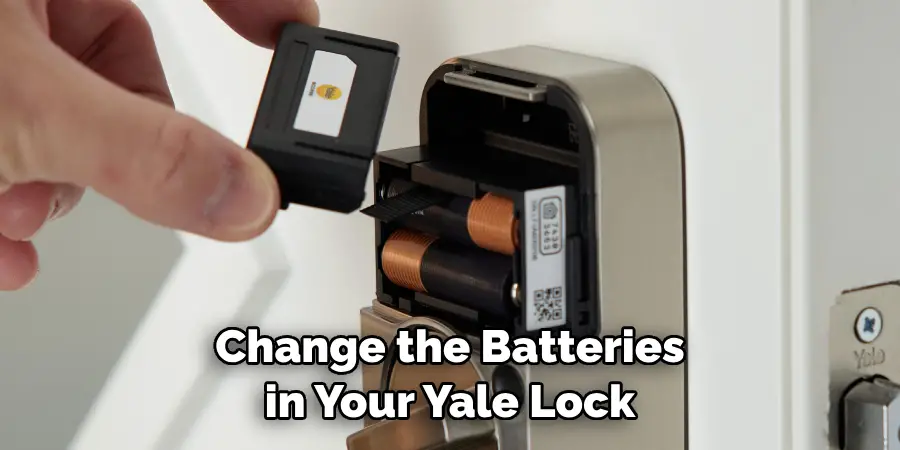
    How to Change Battery in Yale Lock | 5 Quick Steps (2026)
    Source: safetywish.com

    Key Takeaways

    • ✓Use only four new AA alkaline batteries at the same time for best results and accurate app readings.
    • ✓Most US models open from the inside with a phillips screwdriver or a simple pin tool.
    • ✓Battery life averages six to twelve months depending on daily unlocks and Wi-Fi use.
    • ✓A 9-volt battery can temporarily power many keypads if the main cells die completely.
    • ✓Replace batteries as soon as the app or lock gives a low warning to avoid sudden failure.

    What Type of Battery Does a Yale Smart Lock Use

    Nearly every Yale smart lock sold in the United States runs on four standard AA alkaline batteries. These are the same cells you buy at any grocery store or big-box retailer from coast to coast. The lock expects the full 1.5 volts that fresh alkaline cells deliver.

    Rechargeable nickel-metal hydride cells put out only about 1.2 volts. That lower voltage confuses the lock sensors and often triggers false low-battery alerts. Lithium batteries can also cause sudden power drops that leave you locked out without warning.

    Check the label on your specific model if you have an older unit or a specialty version. A few cabinet locks use a single CR2 cell, and some newer European-style Linus models sold through specialty channels may differ. For the vast majority of American front-door installations the rule stays simple: four AA alkaline only.
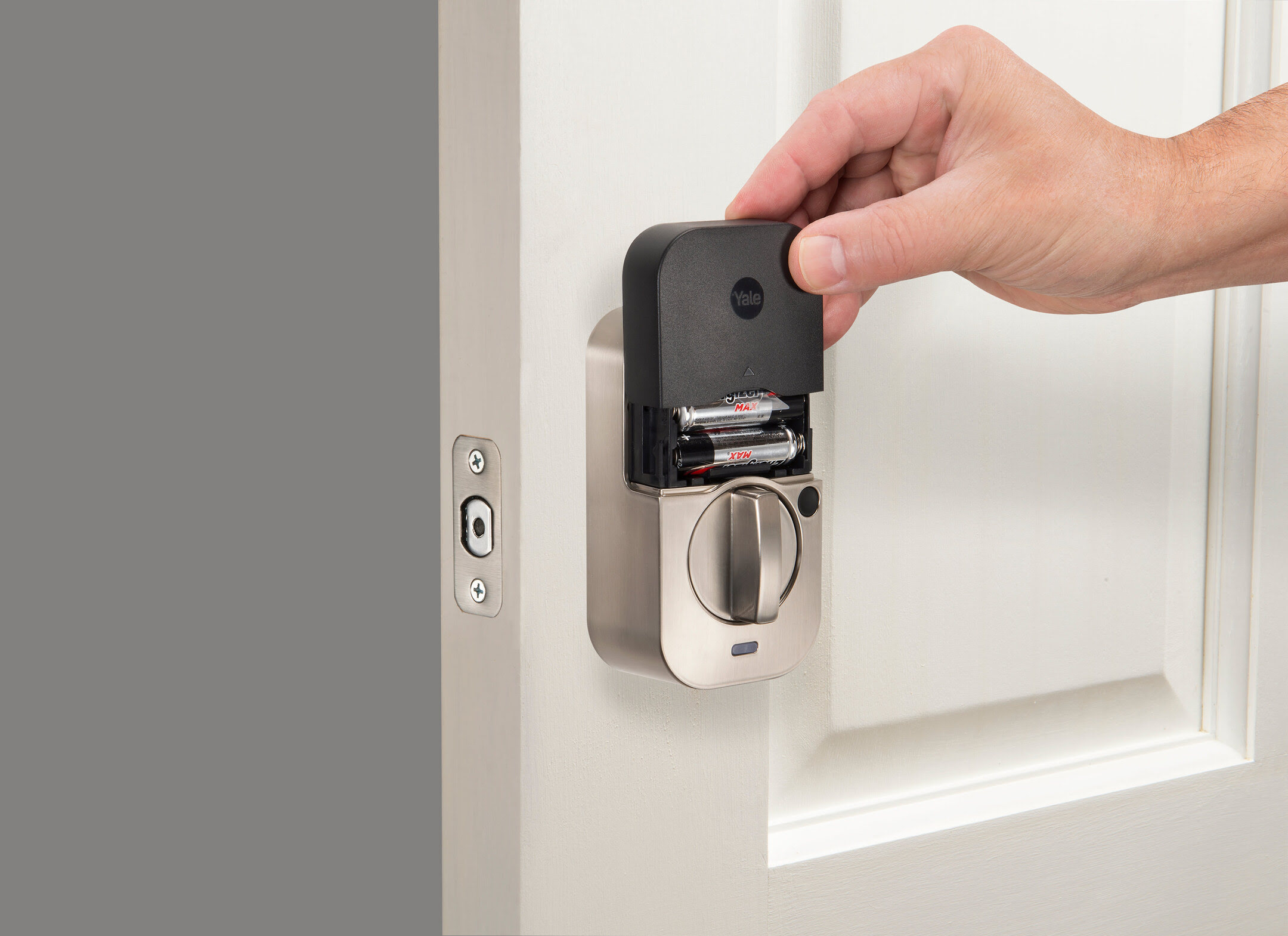
    Yale Keypad Lock Battery Change at Carole Alden blog
    Source: storables.com
    • Recommended type

      Four AA alkaline non-rechargeable batteries from a fresh pack.

    • Avoid these

      Rechargeable NiMH, lithium, zinc-carbon, or mixed old and new cells.

    • Why it matters

      Correct voltage keeps the app battery percentage accurate and prevents early drain.

    How Long Does a Yale Smart Lock Battery Last

    Under typical American household use a set of four AA alkaline batteries lasts six to twelve months. Heavy traffic homes that unlock twenty or more times a day may see closer to six months. Quiet apartments with only a few entries can stretch toward a full year.

    See also  Smart Lock Multiple Users: Easy Access Guide
    Powered by Inline Related Posts

    Several factors shorten life. Frequent remote unlocks through a Wi-Fi bridge, extreme temperature swings near exterior doors, and sticky deadbolts that force the motor to work harder all increase drain. Cold winters in northern states can also reduce capacity until the batteries warm up.

    The Yale Access or Yale Home app sends a low-battery notice when the cells reach roughly twenty to twenty-five percent. Treat that first warning as your signal to buy a new pack. Waiting until the lock starts beeping or flashing red risks a complete shutdown.

    How to Replace Batteries on Yale Lock: Expert Guide
    Source: smarthometekkie.com
    • Average life

      Six to twelve months with normal daily use in US homes.

    • What shortens life

      High unlock counts, Wi-Fi bridge traffic, and temperature extremes.

    • Early warning

      App notification at about twenty-five percent remaining capacity.

    Step by Step How to Change Yale Smart Lock Battery

    Start by unlocking the door and leaving it open. Retract the deadbolt so the thumb turn sits vertical. Gather four fresh AA alkaline batteries and a Phillips screwdriver or the small pin that came with many models.

    Locate the battery cover on the interior side of the lock. On classic Assure models loosen the single screw at the top, then slide the cover upward and off. On Nest x Yale and some lever styles insert a pin or paperclip into the small hole at the top and pull the cover free. Assure Lock 2 models often slide the cover straight up without a screw.

    Remove all four old batteries at once. Do not leave any old cells in place. Match the plus and minus marks printed inside the compartment and insert the new set. You should hear a short welcome chime or see lights flash. Slide or screw the cover back on and test the lock both manually and through the app.

    How To Change Batteries On Yale Lock | Explora Madeira
    Source: i.ytimg.com
    • Tools needed

      Four AA alkaline batteries and a Phillips screwdriver or pin tool.

    • Safety first

      Keep the door open the entire time so you cannot get locked out.

    • Success sign

      Lock chimes or lights flash and the app battery level resets after a few operations.

    Model Specific Notes for Popular US Locks

    Assure Gen 1 and SL models use the screw-and-slide method. Nest x Yale and Assure lever locks rely on the pin hole. Assure Lock 2 versions slide the cover upward with a pull ribbon under the batteries for easy removal. Always replace the full set rather than one or two cells.

    What to Do When Batteries Die Completely

    Many Yale keypads sold in the United States include two metal contacts at the bottom of the exterior face. Hold a standard 9-volt alkaline battery against those contacts while you enter your code. The lock draws enough temporary power to unlock the door so you can go inside and replace the main AA cells.

    See also  How to Unlock Car with Smart Key Inside Easily and Safely
    Powered by Inline Related Posts

    This emergency method works on most touchscreen and push-button Assure models. Once you are inside, change the four AA batteries right away. Operate the lock three times through the app so the low-battery alerts clear from the system.

    If your lock has a physical keyway you can always use the mechanical key as a backup. Key-free models rely on the 9-volt trick or a USB power option on certain newer designs. Keep a fresh 9-volt cell in a kitchen drawer just in case.

    Yale Keypad Lock Battery Change at Carole Alden blog
    Source: i.ytimg.com
    • 9-volt emergency method

      Press a 9-volt battery to the exterior contacts and enter your code.

    • After entry

      Replace the four AA batteries immediately and test with the app.

    • Prevention

      Act on the first low-battery notice so you never reach total drain.

    Common Mistakes and How to Avoid Them

    Mixing old and new batteries is the most frequent error. The weaker cells drag down the stronger ones and can cause leakage that damages the contacts. Always swap the entire set from a brand-new package.

    Using the wrong chemistry creates another set of problems. Rechargeable or lithium cells produce voltage levels the lock does not expect. The result is inaccurate battery readings and sometimes sudden shutdowns.

    Leaving the door closed while you change batteries risks a lockout if the cover or batteries do not seat correctly on the first try. Work with the door open every time. After installation operate the lock a few times from the app so the system updates the battery status and clears any lingering alerts.
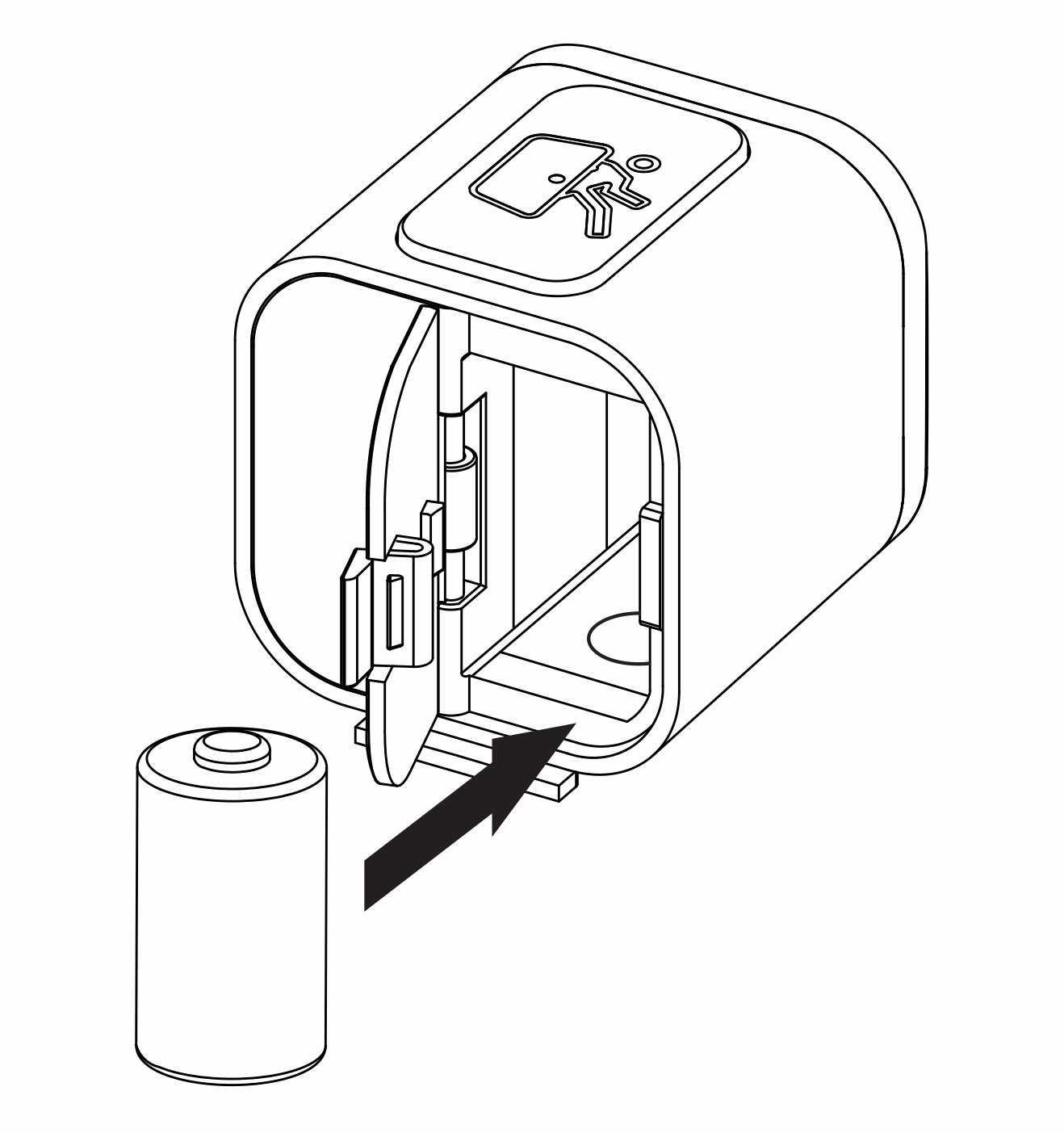
    Troubleshooting the Yale Smart Cabinet Lock | Support | Yale
    Source: cdn.kustomerhostedcontent.com
    • Never mix cells

      Replace all four batteries together from the same fresh pack.

    • Skip rechargeables

      Stick to standard alkaline AA for correct voltage and reliable alerts.

    • Test after change

      Lock and unlock three times through the app to reset the battery report.

    Frequently Asked Questions

    Q

    Can I use rechargeable batteries in my Yale smart lock?

    No. Rechargeable NiMH batteries deliver lower voltage than the lock expects. This leads to false low-battery warnings and shorter real runtime. Stick with standard alkaline AA cells for reliable performance and accurate app readings.

    Q

    How do I know when the yale smart lock battery is low?

    The Yale Access or Yale Home app sends a push notification and email when capacity drops to about twenty or twenty-five percent. Many locks also flash a red light or speak a low-battery message. Replace the cells promptly after the first warning.

    See also  What Is a Marine or Boat Smart Plug? A Practical UK Guide
    Powered by Inline Related Posts
    Q

    Will changing the batteries erase my codes or settings?

    No. User codes, schedules, and app connections stay stored in the lock memory. After you install fresh batteries the lock simply powers back on and continues with the same settings. You only need to operate it a few times so the app updates the battery percentage.

    Q

    What if the low-battery alert continues after I change the cells?

    Operate the lock three times through the app over Bluetooth or Wi-Fi. Manual turns alone do not reset the server-side battery status. If the alert remains after twenty-four hours, double-check that all four cells are fresh alkaline and seated correctly, then contact Yale support.

    Q

    Do all Yale smart locks sold in the US use the same batteries?

    Almost all residential door locks use four AA alkaline batteries. A few specialty cabinet models use a CR2 cell and certain Linus variants sold outside mainstream channels may differ. Check the interior compartment or the original manual for your exact model if you are unsure.

    ✦ Wrapping Up

    Conclusion

    Keeping your Yale smart lock powered is straightforward once you know the right battery type and the simple steps for your model. Four fresh AA alkaline cells, a quick cover removal, and a short test restore full function for months of reliable entry. American homeowners who act on the first low-battery notice rarely face lockouts.

    Store a spare pack of AA batteries and a 9-volt cell in a convenient drawer. When the app warns you, spend five minutes on the change and you protect both convenience and security. Follow the polarity marks, replace the full set, and test with the app so everything stays in sync.

    💡 Key Takeaway

    Buy a four-pack of AA alkaline batteries today, check your lock cover style, and schedule the replacement as soon as the next low-battery alert arrives.

    Author

    • Author-James-Walker.png
      James Walker

      Hi, I’m James Walker, the voice behind Diggons. I’m passionate about helping people make smarter buying decisions through honest reviews, detailed comparisons, and practical tech guides. I focus on smart home devices, workspace setups, and everyday tools that improve productivity and simplify life. My goal is to break down complex product choices into clear, easy-to-understand insights so you can choose with confidence. At DigGons, I share well-researched content designed to save you time, money, and effort — helping you find the best products without the guesswork.

    how to change yale batteries nest yale battery smart lock aa batteries yale assure battery yale battery change yale lock battery life Yale Lock Battery Replacement yale lock low battery yale smart lock battery yale smart lock maintenance

    Related Posts

    Smart Lock Finishes: How To Choose The Right Style

    October 24, 2026

    Oil Rubbed Bronze Smart Lock: A Complete Buying Guide

    October 24, 2026

    Polished Brass Smart Lock: Style And Security Guide

    October 24, 2026
    Leave A Reply Cancel Reply

    Don't Miss

    Smart Lock Finishes: How To Choose The Right Style

    By ETHAN CARTEROctober 24, 2026

    Compare smart lock finishes, from matte black to satin nickel and brass. Learn how to match your door hardware, limit wear, and choose with care.

    Oil Rubbed Bronze Smart Lock: A Complete Buying Guide

    October 24, 2026

    Polished Brass Smart Lock: Style And Security Guide

    October 24, 2026

    Door Lock: Types, Security, And Buying Guide

    October 24, 2026
    What's Hot

    Smart Lock Finishes: How To Choose The Right Style

    October 24, 2026

    Oil Rubbed Bronze Smart Lock: A Complete Buying Guide

    October 24, 2026

    Polished Brass Smart Lock: Style And Security Guide

    October 24, 2026
    About Us

    At DigGons, we help you make smarter buying decisions with trusted reviews, comparisons, and practical tech guides. Our goal is to simplify your shopping by recommending smart home, workspace, and everyday tech products that offer real value and reliability.

    We focus on smart living, office setup, and useful tools to save you time and effort. Every guide is clear, unbiased, and easy to understand, helping you choose the right products with confidence.

    Our Picks

    Smart Lock Finishes: How To Choose The Right Style

    October 24, 2026

    Oil Rubbed Bronze Smart Lock: A Complete Buying Guide

    October 24, 2026

    Polished Brass Smart Lock: Style And Security Guide

    October 24, 2026
    Most Popular

    How Keypad Door Locks Work and Why They Are Secure Solutions

    April 9, 2026

    How to Reset Smart Lock Easily Step by Step Guide for Beginners

    April 9, 2026

    Smart Lock Finishes: How To Choose The Right Style

    October 24, 2026
    • Home
    • About Us
    • Affiliate Disclaimer
    • Contact Us
    • Privacy Policy
    Copyright © 2026 DigGons.com | All Rights Reserved.

    Type above and press Enter to search. Press Esc to cancel.