
Quick Answer: Yes. You can learn piano on a keyboard. A 61-key keyboard teaches notes, chords, rhythm, and simple songs. Touch-sensitive keys help most. An 88-key digital piano feels closer to an acoustic piano.
Many beginners ask this first.
Can a keyboard teach real piano skills?
I get that question a lot.
I’m Daniel Brooks, and I test beginner keyboards often.
Years ago, I started on a cheap 61-key model.
That keyboard felt light and small.
It still taught me plenty.
I learned note names, finger control, and steady rhythm.
I learned easy songs and basic chords.
I learned how both hands work together.
That early start mattered a lot.
Like James Walker, I like plain advice that helps fast.
Here is the short truth.
A keyboard can teach real piano basics well.
Still, the right features shape your progress.
Touch-sensitive keys matter from the start.
A sustain pedal jack helps later songs.
USB or MIDI helps lesson apps track notes.
Headphones help you practice more often.
Key count matters once songs grow wider.
A 61-key model works for early study.
An 88-key model gives more room and better range.
Many new players buy the wrong keyboard first.
Some fight setup issues and lose time.
Some skip basic habits and feel stuck.
I want to save you that trouble.
This guide shows what works, what fails, and what to buy.
Key Takeaways
- Yes, you can learn piano on a keyboard.
- Touch-sensitive keys help you build better control.
- 61 keys work for early lessons and easy songs.
- 88 keys fit long-term piano study better.
- USB or MIDI helps lesson apps read notes.
- A pedal jack gives you more room to grow.
- Daily practice matters more than fancy extras.
Author: Daniel Brooks
I test beginner keyboards, pedals, stands, lesson apps, and home practice setups. I like gear that helps new players start fast and keep going.
What This Means for Beginners
Learning piano means more than pressing correct notes.
You need rhythm, finger control, timing, and coordination.
You need to shape soft and loud notes.
You need both hands to work together.
A keyboard can teach those skills.
The keyboard just needs decent basics.
A very cheap model can slow you down.
No touch response creates flat practice.
Too few keys can block harder songs later.
No pedal jack can limit song work too.
Why a Keyboard Can Teach Real Piano Skills
A keyboard makes practice easy to start.
That helps more than many people expect.
You can set it up at home fast.
You can practice with headphones at night.
You can use a metronome built into many models.
You can link apps for note feedback.
That mix helps beginners stay steady.
My first keyboard did exactly that.
I practiced more often since setup felt simple.
That habit built my base.
How Learning Piano on a Keyboard Works
Touch-Sensitive Keys
Touch-sensitive keys change volume with finger force.
That teaches control from day one.
Without it, every note feels almost the same.
That can hurt your musical control.
Key Count and Song Range
Sixty-one keys fit many early songs.
Seventy-six keys give more room.
Eighty-eight keys match a full piano.
That helps once pieces grow wider.
USB, MIDI, and Lesson Apps
USB or MIDI links the keyboard to lesson apps.
Then the app reads your notes.
That gives clear feedback on timing and pitch.
Wired links usually feel more stable.
Pedals, Headphones, and Daily Practice
A sustain pedal makes many songs sound fuller.
Headphones make practice quiet and simple.
A ready setup helps daily practice happen.
That habit drives real progress.
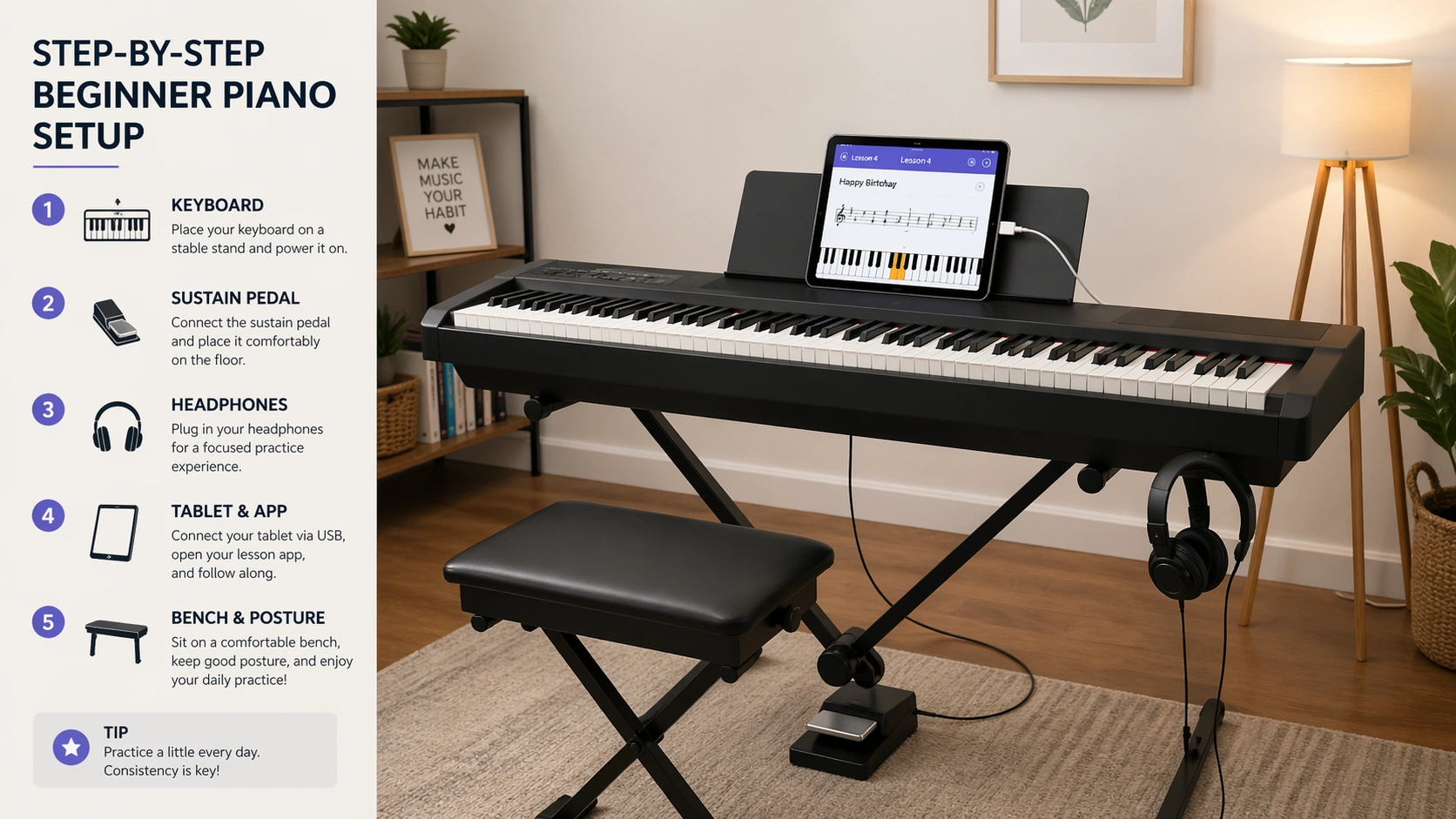
How to Start Learning Piano on a Keyboard Step by Step
- Pick a keyboard with touch-sensitive full-size keys.
- Choose at least 61 keys.
- Get a stand, bench, and sustain pedal.
- Place the keyboard near elbow height.
- Use headphones for quiet practice.
- Learn finger numbers first.
- Practice five-finger patterns and simple scales.
- Use a metronome every day.
- Play easy songs with both hands.
- Add app feedback or a teacher weekly.
Best Keyboard Types Explained
| Type | Best For | Main Win | Main Limit |
|---|---|---|---|
| 61-key portable keyboard | New beginners | Low cost and easy setup | Less room for big songs |
| 76-key keyboard | Beginners who want more range | More room for two-hand music | Still lighter than a piano |
| 88-key digital piano | Long-term piano study | Closer feel to acoustic piano | Higher cost and larger size |
| MIDI keyboard | App-based learning | Strong software control | Needs a device for sound |
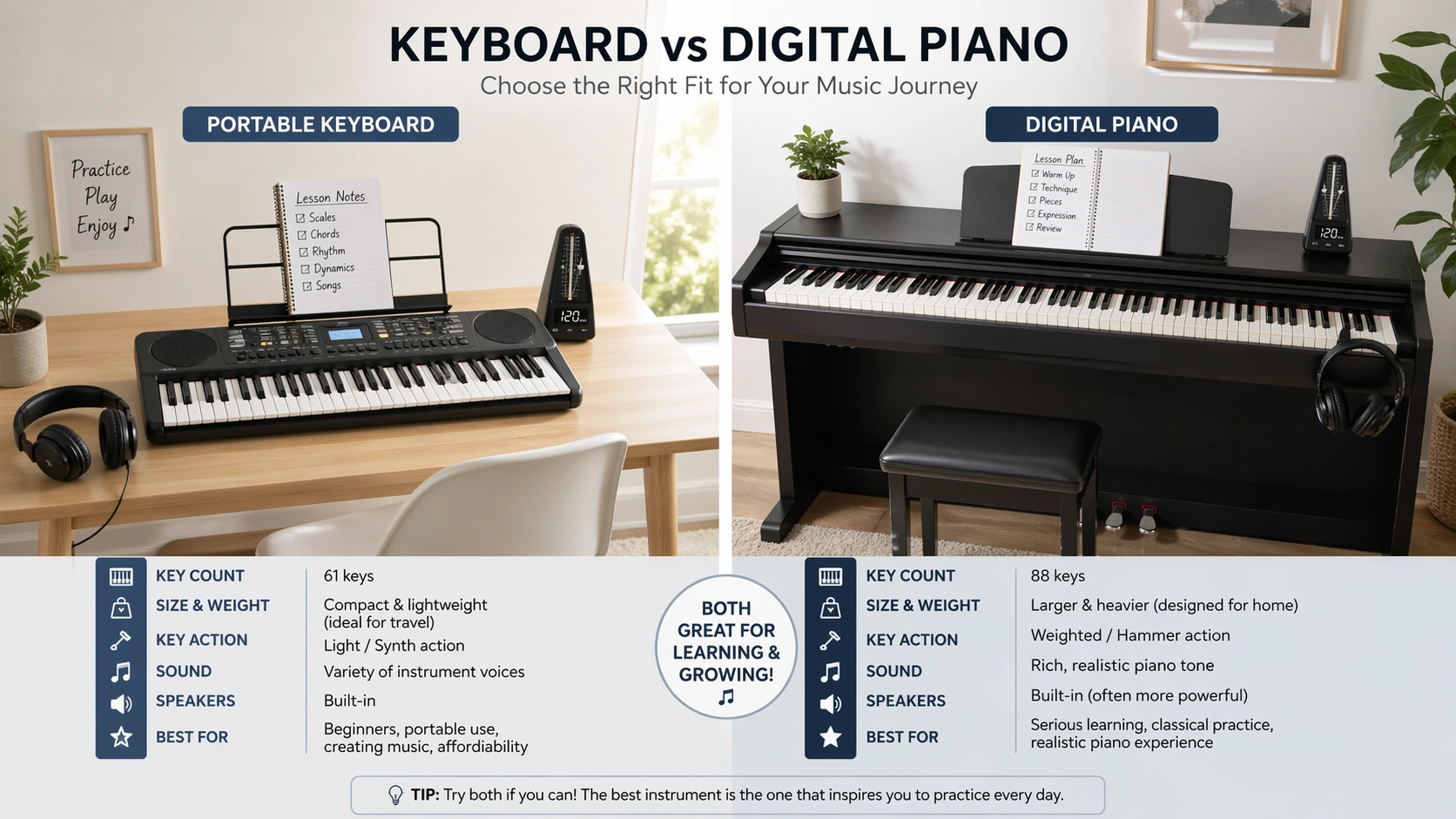
Keyboard vs Digital Piano: Full Comparison
| Feature | Portable Keyboard | Digital Piano |
|---|---|---|
| Best use | Starter lessons and casual practice | Long-term piano study |
| Usual key count | 61 or 76 | 88 |
| Key feel | Light to medium | Closer to piano feel |
| Portability | Easy to move | Heavier |
| Price | Lower | Higher |
| Growth room | Good for basics | Better for advanced study |
Common Keyboard Problems and Fixes
| Problem | Likely Cause | Quick Fix |
|---|---|---|
| Lesson app does not see keyboard | Wrong cable or wrong port | Use USB TO HOST or MIDI OUT |
| No sound in headphones | Wrong jack or low volume | Check output jack and level |
| Pedal works backward | Pedal connected after startup | Restart after reconnecting pedal |
| Notes feel flat | No touch response | Turn on touch setting or upgrade |
| Bluetooth feels delayed | Wireless lag | Use a wired USB or MIDI link |
| Keyboard shuts off | Weak adapter or power setting | Check adapter and auto-off menu |
Common Mistakes to Avoid
- Buying a keyboard with no touch response.
- Picking too few keys for your goal.
- Skipping bench height and posture.
- Practicing songs only, not core drills.
- Ignoring rhythm work.
- Using Bluetooth first for lessons.
- Waiting too long to add a pedal.
Pro Tips and Best Practices
- Practice 15 to 20 minutes each day.
- Start slow, then raise speed later.
- Count out loud in hard bars.
- Use scales and chords each week.
- Record one short clip every week.
- Keep your setup ready at all times.
- Move to 88 keys once songs demand it.
Tool Recommendations
These tools help most beginners.
- Stable keyboard stand
- Simple bench
- Sustain pedal
- Closed-back headphones
- USB cable or MIDI cable
- Lesson app with note feedback
Helpful official resources:
Roland GO:KEYS 3
Fun choice for beginners who like songs, sounds, and home practice.
FAQ
Can I learn piano on a 61-key keyboard?
Yes. A 61-key model teaches basics well. It fits early songs, chords, scales, and hand work.
Do I need weighted keys to start piano?
No. Touch-sensitive keys matter first. Weighted keys help later, once technique grows.
Is a keyboard enough for adult beginners?
Yes. Adults can start well on a keyboard. Daily practice matters more than fancy gear.
Can I use a MIDI keyboard to learn piano?
Yes. A MIDI keyboard works with good software. You need a phone, tablet, or computer.
When should I move to 88 keys?
Move up once your songs need more range. Move sooner if you want fuller piano feel.
Does touch sensitivity really matter?
Yes. It teaches soft and loud control. That skill matters in real piano playing.
Is buying a keyboard first worth it?
Yes. It lowers your starting cost and helps you build a daily habit.
Final Thoughts
Can you learn piano on a keyboard? Yes, you can.
Start with a keyboard that supports real practice habits.
Touch-sensitive keys, enough range, and daily use matter most.
A simple start beats waiting for a perfect setup.