

Quick Answer: A full size keyboard in the USA usually has 104 keys. Some international full size keyboards have 105 keys, while Japanese JIS models may have 108 or 109 keys.
I’m Daniel Brooks, and I’ve spent years testing keyboards, office tech, and computer accessories in real workspaces. James Walker once asked me why two “full size” keyboards had different key counts. The answer is simple once you understand layouts, number pads, and extra function keys.
What Is a Full Size Keyboard and Why Does It Matter?
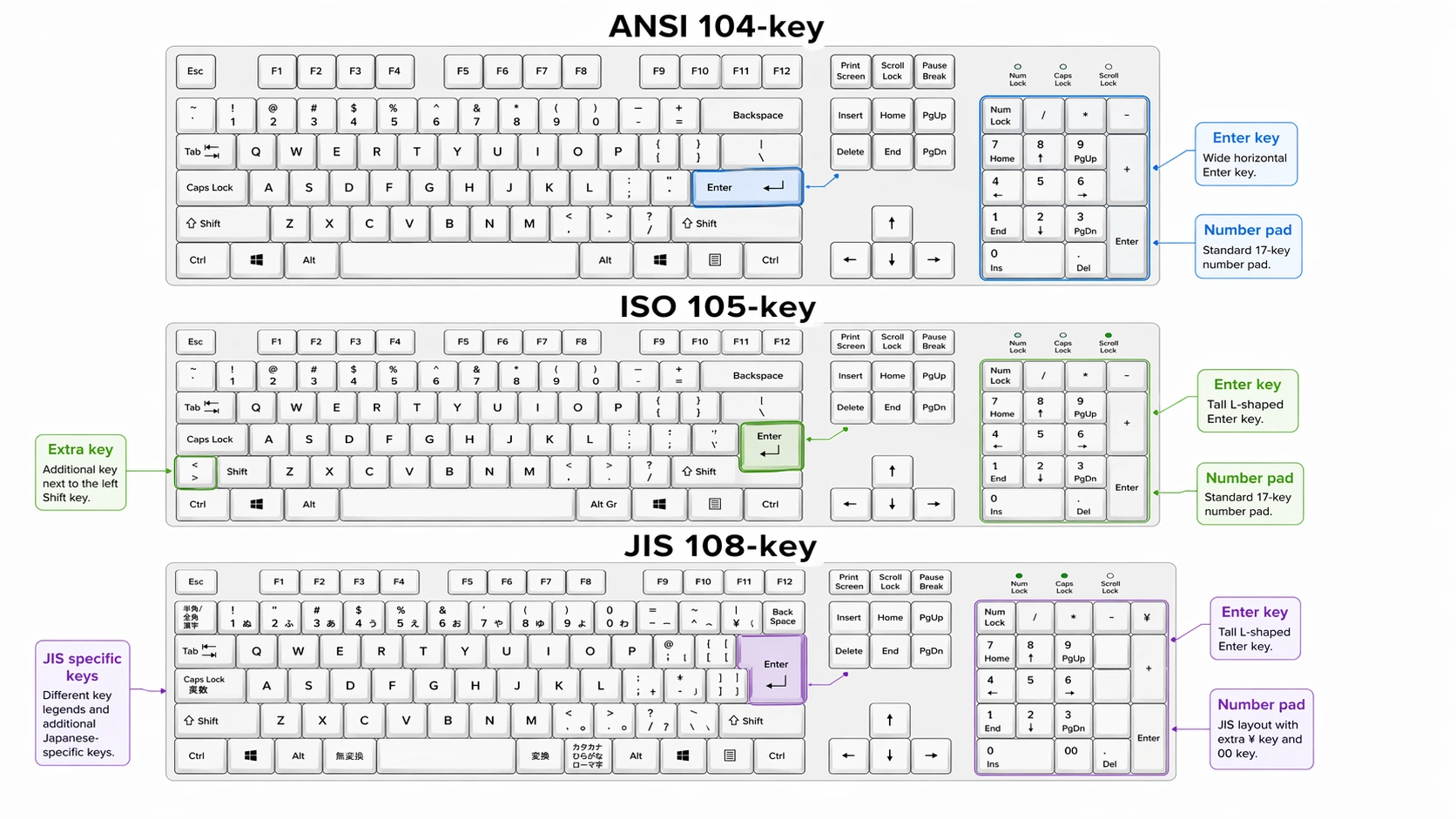
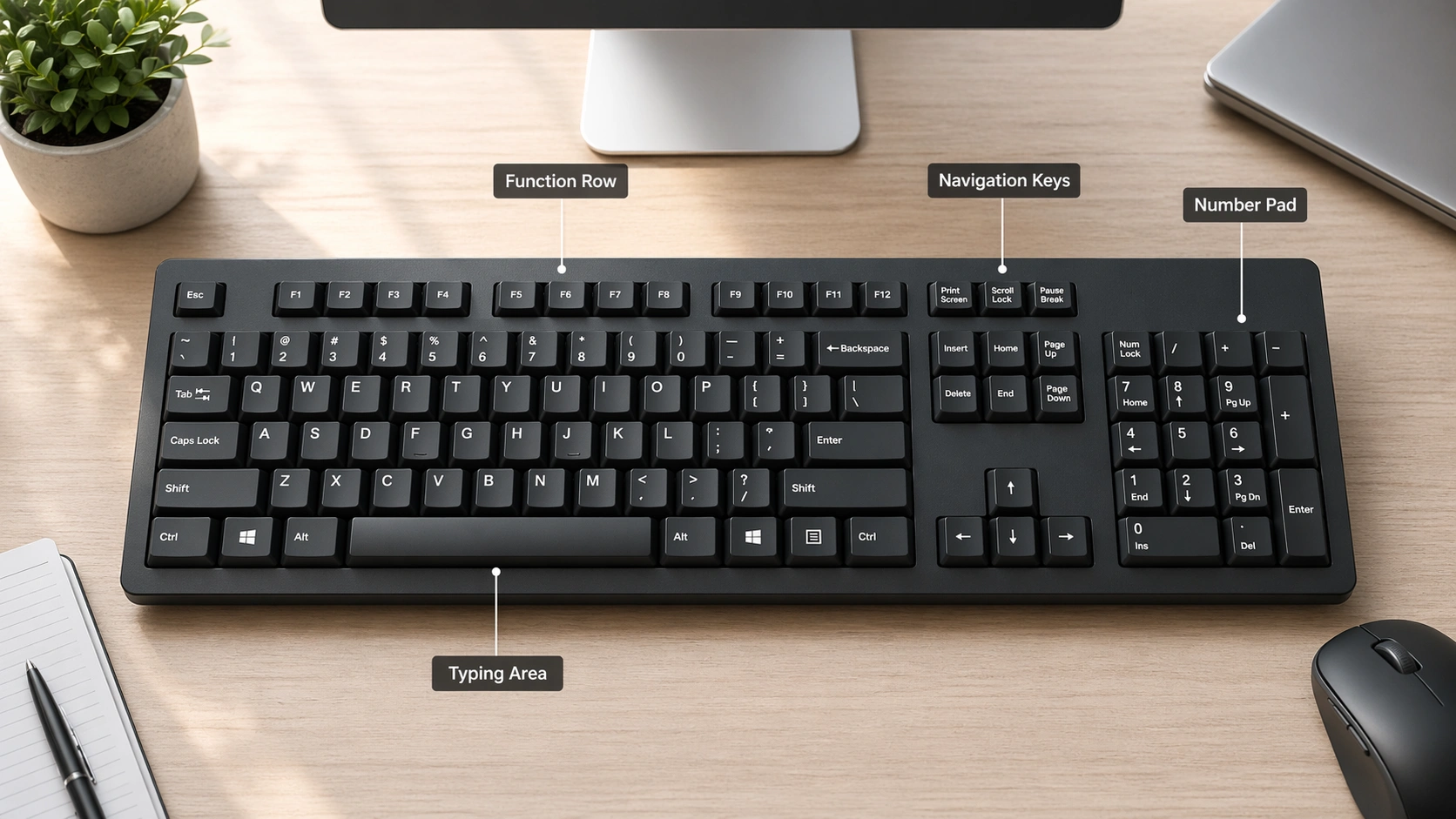
A full size keyboard is the standard desktop keyboard layout with a typing area, function row, arrow keys, navigation keys, and a number pad. In the USA, this usually means a 104-key ANSI keyboard.
The main reason people choose a full size keyboard is the number pad. It saves time when you work with spreadsheets, invoices, accounting software, passwords, measurements, or calculator-style input.
A full size keyboard also helps when you want a familiar setup. You do not need to learn layers or shortcuts just to use Home, End, Page Up, Page Down, or numeric keys.
How a Full Size Keyboard Works
A full size keyboard is split into clear zones. Each zone has a job. Once you know the zones, the key count makes more sense.
Main Typing Area
This is the section with letters, numbers, punctuation, Shift, Ctrl, Alt, Enter, Backspace, Tab, and Caps Lock. It is the part most people use for typing emails, documents, searches, and passwords.
Function Row
The top row includes Esc and F1 through F12. On many modern keyboards, these keys also control brightness, volume, search, dictation, or media playback.
Navigation Cluster
This section includes Insert, Delete, Home, End, Page Up, and Page Down. These keys are useful when editing documents, coding, or moving through long web pages.
Arrow Keys
The four arrow keys help you move through text, spreadsheets, menus, and games. Full size keyboards keep these keys separate, which makes them easy to find without looking down.
Number Pad
The number pad is the biggest difference between a full size keyboard and smaller layouts. It includes numbers, math symbols, Num Lock, Enter, and decimal keys. This is why full size keyboards are popular for office work.
Special Shortcut and Media Keys
Some keyboards add extra media keys, macro keys, calculator keys, or profile buttons. These extra keys may increase the total count beyond 104.
Full Size Keyboard Key Count by Layout
The answer to how many keys in full size keyboard depends on the layout. For USA buyers, the common answer is 104 keys. Other regions may use different layouts.
| Keyboard Layout | Common Key Count | Where It Is Common | Main Difference |
|---|---|---|---|
| ANSI | 104 keys | USA and Canada | Wide Enter key and smaller left Shift changes compared with ISO |
| ISO | 105 keys | Europe and some other regions | Tall Enter key and one extra key near the left Shift |
| JIS | 108 or 109 keys | Japan | Extra language input keys |
| Gaming or media full size | 104+ keys | Worldwide | May include macro, volume, or profile keys |
104-Key ANSI Keyboard in the USA
The 104-key ANSI layout is the standard full size keyboard layout for most USA users. It includes the number pad, function row, navigation cluster, and arrow keys.
105-Key ISO Keyboard
A 105-key ISO keyboard is still full size. It has a slightly different Enter key shape and one extra key near the left Shift area. This layout is more common outside the USA.
108 or 109-Key JIS Keyboard
Japanese JIS keyboards often include extra language input keys. That is why they may have 108 or 109 keys while still being considered full size.
Why Product Listings May Show Different Key Counts
Some brands add media keys, macro keys, knobs, or special shortcut buttons. So a product may be full size but show more than 104 keys. Always check the layout image before buying.
How to Count Keys on a Full Size Keyboard Step-by-Step
You can count a keyboard by section. This is the easiest way to avoid confusion.
- Count the main typing section first.
- Count Esc and F1 through F12 in the function row.
- Count the navigation cluster.
- Count the four arrow keys.
- Count the full number pad.
- Add any extra media, macro, profile, or calculator keys.
If your keyboard has the standard USA layout and no extra buttons, the final count should be 104 keys.
Full Size Keyboard vs Other Keyboard Sizes: Full Comparison
A full size keyboard is not always the best choice for every desk. It gives you more keys, but it also takes more space.
| Keyboard Size | Typical Keys | Number Pad | Best For |
|---|---|---|---|
| Full Size / 100% | 104 to 109 | Yes | Office work, data entry, spreadsheets, accounting |
| TKL / Tenkeyless | About 87 | No | Gaming, small desks, more mouse room |
| 75% | About 80 to 84 | No | Compact workspaces with function keys |
| 60% | About 61 | No | Minimal desks, travel, advanced shortcut users |
| 96% | About 96 to 100 | Yes | Users who want a number pad in less space |
Full Size vs TKL
A TKL keyboard removes the number pad. This gives your mouse more room. But if you work with numbers every day, a full size keyboard is easier.
Full Size vs 75 Percent
A 75 percent keyboard keeps many useful keys but packs them close together. It saves space, but it can feel cramped if you are used to a normal desktop keyboard.
Full Size vs 60 Percent
A 60 percent keyboard is small and clean. But it removes many direct keys. You need shortcuts for arrows, function keys, and navigation commands.
Full Size vs 96 Percent
A 96 percent keyboard is a strong middle ground. It keeps the number pad but reduces empty space. The downside is that some keys feel closer together.
Common Full Size Keyboard Problems and Fixes
Even a simple keyboard can cause setup issues. Most problems come from layout settings, connection mode, power, drivers, or software.
| Problem | Likely Cause | Simple Fix |
|---|---|---|
| Number pad not working | Num Lock is off | Press Num Lock and test the number pad again |
| Keyboard not detected | Bad USB port, cable, receiver, or driver | Try another USB port, restart the PC, and check Device Manager |
| Wireless keyboard disconnects | Low battery, weak signal, or USB receiver interference | Charge the keyboard, move the receiver closer, or use a USB extension cable |
| Function keys act wrong | Fn Lock or software setting | Check Fn Lock, keyboard app settings, or BIOS keyboard mode |
| Keyboard app cannot detect device | Wrong connection mode or missing software support | Use wired mode if needed and install the brand’s official software |
| Keys type the wrong symbols | Wrong language or layout selected | Set the keyboard layout to US ANSI in system settings |
Why Your Number Pad Is Not Working
The first thing I check is Num Lock. Many people think the number pad is broken when Num Lock is simply turned off. Press Num Lock once and try typing numbers again.
How to Fix a Keyboard That Won’t Connect
For a wired keyboard, test another USB port. For a wireless keyboard, check the battery, receiver, Bluetooth pairing, and connection mode. Some keyboards have separate switches for Bluetooth, 2.4GHz, and wired mode.
Why Your Wireless Keyboard Keeps Disconnecting
Wireless keyboards can drop connection when the battery is low or the receiver is too far from the keyboard. Metal desks, USB hubs, and crowded wireless devices can also cause signal issues.
How to Fix Function Keys That Act Wrong
If F1 through F12 control volume or brightness instead of normal function commands, check the Fn Lock key. On some laptops and keyboards, you can change this in the keyboard app or system settings.
How to Fix Keyboard App or Software Detection Problems
Some keyboard software only detects the keyboard in wired mode. This is common with advanced mechanical keyboards that use firmware tools. Connect the cable, open the app again, and check for firmware updates.
Common Full Size Keyboard Mistakes to Avoid
- Buying the wrong layout: USA users should usually choose ANSI unless they know they need ISO or another layout.
- Ignoring desk space: A full size keyboard can push your mouse too far to the side.
- Skipping compatibility checks: Mac and Windows keys may work differently.
- Choosing wireless without checking battery life: Backlighting can reduce battery life fast.
- Paying for features you will not use: Macro keys, knobs, and RGB lights are useful only if they fit your workflow.
Best Full Size Keyboard Types Explained
Not all full size keyboards feel the same. The key count may be similar, but the typing experience can be very different.
| Keyboard Type | Best For | Main Benefit | Possible Downside |
|---|---|---|---|
| Mechanical | Typing, gaming, customization | Better feel, replaceable switches on some models | Can be louder and more expensive |
| Membrane | Basic office and home use | Affordable and quiet | Less precise feel |
| Low-profile | Office desks and laptop users | Slim, quiet, and easy to type on | Less key travel than mechanical boards |
| Ergonomic | Long typing sessions | Better wrist and hand position | May take time to learn |
| Gaming | Games and shortcuts | Fast response, RGB, macros, software control | Can look too busy for office setups |
Tool Recommendations for Office and Workspace Setup
Here are a few tools and accessories I recommend when setting up or fixing a full size keyboard.
- USB-C cable or USB extension cable for stable wired testing
- Compressed air or a soft brush for cleaning between keys
- Keycap puller for mechanical keyboards
- Wrist rest for long typing sessions
- Desk mat to reduce keyboard movement
- Keyboard brand software for firmware, macros, and layout control
For layout help, you can compare ANSI and ISO keyboard differences using Logitech’s ANSI vs ISO keyboard guide. Windows users can also review official layout references from Microsoft Windows keyboard layouts. If you want an advanced full-size mechanical example, the Keychron Q6 Max product page shows modern full-size features like wired, Bluetooth, and 2.4GHz modes.
Recommended Full Size Keyboard Options
Logitech MX Keys S Wireless Keyboard
A slim full size keyboard for quiet office typing, multi-device use, and clean desk setups.
Keychron Q6 Max Full Size Mechanical Keyboard
A premium full size mechanical keyboard for users who want strong build quality, wireless modes, and programmable keys.
Logitech ERGO K860 Wireless Ergonomic Keyboard
A full size ergonomic option for long workdays, better wrist angle, and quieter office typing.
Full Size Keyboard Buying Guide: What Works Best for Your Desk?
Best for Office Work
Choose a quiet low-profile or membrane full size keyboard if you work around other people. Look for a strong number pad, stable wireless connection, and comfortable key spacing.
Best for Gaming
Choose a full size mechanical keyboard if you want faster key feel, stronger feedback, and programmable shortcuts. Just make sure the board leaves enough room for your mouse.
Best for Long Typing Sessions
Choose an ergonomic or low-profile keyboard if you type for hours. A wrist rest and neutral hand position matter more than RGB lighting.
Best for Small Desks
If you still need a number pad but have limited space, consider a 96 percent keyboard. It keeps most full size features but uses a tighter layout.
Best for Mac and Windows Users
Choose a keyboard with clear Mac and Windows support. Some keyboards include a physical switch, extra keycaps, or software profiles for both systems.
Pro Tips for Getting the Most From a Full Size Keyboard
- Use number pad shortcuts: They can speed up spreadsheet and calculator work.
- Set up programmable keys: Use them for email, screenshots, app launchers, or common text.
- Keep firmware updated: This can fix connection, battery, and key mapping issues.
- Choose the right switch type: Linear switches feel smooth, tactile switches give feedback, and clicky switches make more noise.
- Keep your wrist position neutral: A better typing angle can reduce strain during long sessions.
FAQ: How Many Keys in Full Size Keyboard?
How many keys are in a full size keyboard in the USA?
Most full size keyboards in the USA have 104 keys. This is the common ANSI layout with a typing area, function row, navigation keys, arrow keys, and number pad.
Why do some full size keyboards have 105 keys?
Some full size keyboards have 105 keys because they use the ISO layout. ISO keyboards have a different Enter key shape and one extra key near the left Shift area.
Is a 104-key keyboard the same as a full size keyboard?
Yes, in the USA, a 104-key keyboard is usually a full size keyboard. It includes the number pad and all standard desktop keyboard sections.
Are full size keyboards good for gaming?
Full size keyboards can be good for gaming if you have enough desk space. Some gamers prefer smaller keyboards because they give the mouse more room.
Why is my number pad not working?
Your number pad may not work because Num Lock is turned off. It can also happen because of driver issues, wrong keyboard settings, or a wireless connection problem.
Can I use a full size Windows keyboard on a Mac?
Yes, you can use many full size Windows keyboards on a Mac. Some keys may act differently, so you may need to adjust modifier keys in macOS settings.
Is a compact keyboard better than a full size keyboard?
A compact keyboard is better for small desks and extra mouse space. A full size keyboard is better for number entry, office work, and users who want every key available.
Final Thoughts
So, how many keys in full size keyboard? For most USA users, the answer is 104 keys. ISO keyboards may have 105 keys, and JIS keyboards may have 108 or 109 keys.
My advice is simple. Choose a full size keyboard if you use the number pad often, work with spreadsheets, or want a familiar desktop layout. If your desk is small or you need more mouse space, compare TKL or 96 percent keyboards before buying.
About Daniel Brooks: I’m Daniel Brooks, a hands-on tech writer who tests keyboards, office accessories, smart devices, and workspace tools. I focus on simple advice that helps real people fix setup problems and buy gear that actually fits their daily work.